
Mobile apps shape daily life, business, and health. If you want to choose the right niche, this article explains the best mobile app categories and how to pick one that fits your skills and market. Read on to learn clear, practical steps for planning, design, and launch.
Top app categories to consider
Choosing a category starts with knowing which areas attract users and revenue. Some categories grow fast. Others earn steady income. Knowing the main options helps you narrow focus and set realistic goals for your project.
Below is a clear list of leading categories that consistently drive downloads and engagement. Each item includes what users expect and why it can work for a new app. Use this to map your strengths to market needs.
- Social and Communication: Apps for messaging, groups, and social sharing. They need strong privacy controls and fast performance.
- Productivity and Tools: Task managers, note apps, and utilities. Users value speed, reliability, and simple workflows.
- Entertainment and Media: Video, music, and streaming apps. These require strong content partnerships and smooth playback.
- Games: Casual, strategy, and puzzle games. Games can scale quickly if they hook players early.
- Shopping and E-commerce: Marketplaces and retail apps. They need secure payments and clear product pages.
- Finance and Banking: Personal finance, investing, and payments. Security and trust are essential in this category.
- Education and E-learning: Learning platforms and study tools. They work well with progress tracking and bite-sized lessons.
- Health and Fitness: Tracking, coaching, and wellness apps. Expect regulatory checks and privacy rules.
- Travel and Local: Booking, maps, and local guides. Real-time data and reviews add value.
- Utilities and Device Tools: Battery savers, file managers, and settings. These need low-level optimization and clear permissions.
Each category offers different entry costs and user expectations. For example, games often need more design time, while a niche productivity app can launch faster. Match your timeline and budget to the category you pick.
When you pick one of the best mobile app categories, plan for user retention. Downloads are a start, but repeat use defines long-term success. Think about notifications, rewards, and ongoing value.
How to choose the right category
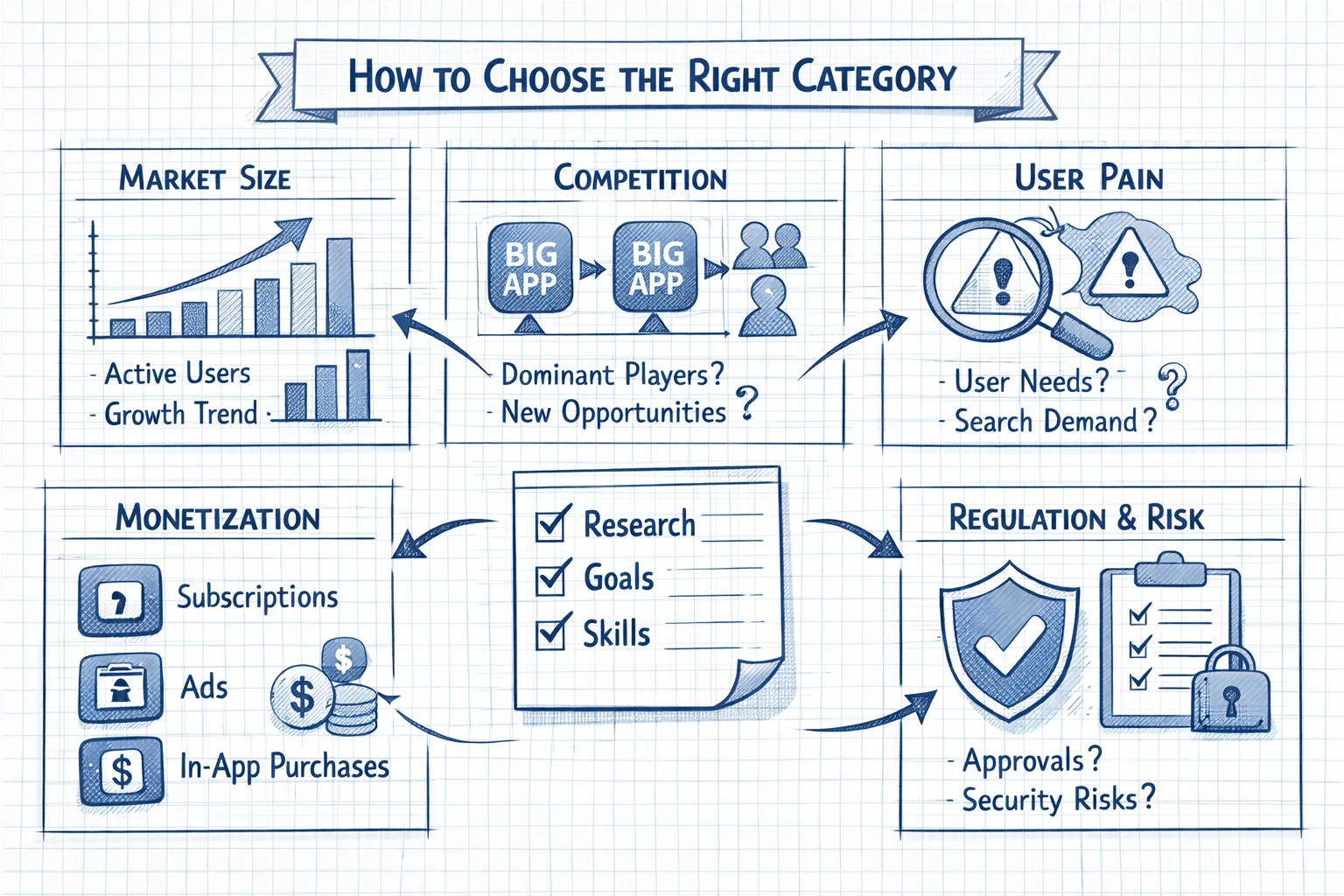
Picking the right category combines research, goals, and honest skill review. Start by listing your strengths and what users in each category truly need. This step reduces wasted work and helps set clear priorities for features.
Use the short checklist below to guide your decision. Apply each item to at least three categories you like. This gives a fair comparison and helps you pick one strong option to pursue.
- Market size: How many active users are in the category and is growth steady?
- Competition: Are there dominant players or is there room for new ideas?
- User pain: Are users actively searching for solutions now?
- Monetization: Does the category support subscriptions, ads, or one-time purchases?
- Regulation and risk: Does the category need special approvals or high security?
After comparing categories, pick one that fits your team and timeline. If you are solo or small, a focused tool or niche service can be better than a broad social app. Smaller scope helps you ship faster and iterate based on feedback.
Finally, validate your choice with a lightweight test. A landing page, a simple prototype, or an ad campaign can show real interest without full development. Use early data to refine features and confirm the category is a fit.
Design and user experience essentials
Good design makes an app useful and enjoyable. Focus on clarity, speed, and a friendly flow. Users decide within seconds whether to stay or leave, so aim for immediate value and low friction.
Below are key design priorities. Follow these to improve retention and reviews. The phrase Mobile app design matters here because small choices can change user behavior a lot.
- Simple onboarding: Show core value in one or two screens and let users act quickly.
- Consistent UI: Use familiar patterns so users do not need to learn new gestures.
- Performance: Fast load times and smooth animations reduce dropoff.
- Accessibility: Support larger text, voiceover, and easy navigation.
- Feedback loops: Show clear success and error messages to guide users.
Design is not decoration. It answers user questions silently. A clear layout reduces support requests and improves metrics like session length and task completion.
Test designs with real users early. Even a small group will reveal confusing labels, missing steps, or slow flows. Use simple A B tests to choose between two navigation options or button placements.
Monetization models that work
Choosing how to earn revenue depends on category, audience, and the value you deliver. Some models work better in certain categories. For example, games often use in-app purchases while productivity apps favor subscriptions.
Below is a short guide to common models. Read each option and compare to user expectations in your chosen category before deciding.
- Free with ads: Good for high-traffic apps where monetization is volume-based.
- Freemium: Basic free features with paid upgrades. Works well for tools and services.
- Subscriptions: Recurring revenue for ongoing value. Ideal for education and productivity apps.
- One-time purchase: Clear value for standalone tools or premium content.
- In-app purchases: Common for games and media to sell items or upgrades.
Match your model to the product and audience. For example, enterprise users often accept subscriptions, while casual consumers may respond better to a free tier with optional purchases.
Track metrics by cohort and adjust pricing. If adoption is slow, test a lower price or a trial period. If churn is high, focus on improving value before raising prices.
Development and launch tips
A clear development plan saves time. Define a minimum viable product that solves one clear problem well. Avoid trying to build every feature on day one. Shipping faster gives you real feedback to guide the roadmap.
The short checklist below helps you move from idea to live app without common traps. Use it to set milestones and reduce risk during development and launch phases.
- Build an MVP: Include only core features needed to test demand.
- Use analytics: Track events that show user progress and pain points.
- Prepare for scale: Design backend and data flows that can grow.
- Beta test: Get real users to try the app and collect clear feedback.
- Iterate quickly: Fix major issues and improve high-impact flows before wide launch.
Also plan for app store needs like descriptions, screenshots, and keywords. These elements affect discoverability in stores and can increase organic downloads if done well.
Post-launch, watch retention and reviews. Early adopters often give detailed feedback. Use it to plan improvements and to guide support content and help features.
Trends worth watching
Trends shift how users choose and use apps. Watch for new patterns in how people interact with mobile apps and which categories gain momentum. This helps your product stay relevant and competitive.
Here is a short list of trends that affect many of the best mobile app categories today. Keep these in mind while planning features and marketing strategies.
- AI features: Small, smart automations and recommendations improve usability across categories.
- Health integrations: Mobile apps for healthcare and wellness are growing as users track more metrics.
- Privacy-first design: Users expect clear data use and easy controls.
- Cross-platform sync: Seamless experience between phone, tablet, and web raises retention.
- Micro-payments and wallets: Many apps add simple payments to improve conversions.
Not every trend suits every app. Evaluate trends against your user needs and technical capacity. Adding a trendy feature without clear value can waste resources.
Focus on trends that improve the core experience or reduce friction. For instance, if your app helps with fitness, adding a reliable integration with wearables may boost trust and daily use.
Key Takeaways
Choosing among the best mobile app categories requires clarity on users, value, and your team. Start with a strong category fit, then design for speed and ease. The right match increases your chance to grow and earn revenue.
Use the short lists in this article to evaluate categories, pick a monetization model, and plan a lean launch. Test early and listen to users to guide the product roadmap. Small, frequent updates keep apps fresh and useful.
Remember to prioritize Mobile app design, security, and clear onboarding. These elements matter across categories and often separate successful apps from the rest.
Finally, build for measurement and iteration. Track the key metrics for your category and adjust product, pricing, and marketing based on real user data. With steady focus and smart choices, you can pick a top category and create an app users love to use.
