
Good UI design can make an app feel fast and reliable. In this article you will learn how UI design impact on apps, what causes slow behavior, and practical steps you can take to make interfaces faster. Read on for clear, actionable guidance to improve both speed and satisfaction.
How UI design impact on apps
UI choices shape how an app behaves in the real world. Simple layout decisions, image sizes, and interaction patterns all affect load time and responsiveness. A well-made interface can hide delays. A poor one can make a fast backend feel slow.
The visual design also guides what the app does first. If the UI tries to render too many elements at once, the app can stutter. Thoughtful staging of content reduces strain on the device. That leads to smoother scrolling and faster perceived performance.
People judge speed by what they see. If animations run smoothly and taps respond quickly, users feel the app is fast. If buttons lag or screens flicker, users lose trust. UI design impact on apps is about both real performance and perceived speed.
Designers and developers need to work together. A UI that looks great but is heavy to render will hurt retention. When teams plan screens with performance in mind, the result is more efficient code and happier users. That teamwork is a key to good app performance.
Key metrics UI affects
Several metrics show how UI design impact on apps. These metrics tell you where to focus improvements. Measuring them gives clear targets for design and development work.
Below is a list of core metrics to watch. Each one links directly back to design choices you can control. Track these to measure the effect of UI changes.
- Load time: How long the first screen takes to appear. Large images, heavy fonts, and many initial API calls increase load time.
- Frame rate and jank: Smooth animation is often measured as frames per second. Complex layouts or heavy JavaScript reduce frame rate.
- Time to interactive: When the UI becomes responsive. Blocking operations on the main thread delay interactivity.
- Memory usage: How much RAM the app uses. More UI elements and high-res assets increase memory and can cause crashes.
- Battery and CPU use: Animations and frequent background tasks raise CPU load and battery drain.
Each metric gives a different view of performance. Use them together to understand both technical and perceived speed. That helps prioritize fixes that matter most to users.
Design choices that hurt performance
Some common design patterns cause poor performance when applied without care. Knowing these pitfalls helps you avoid them early in the process. Designers can choose alternatives that look similar but cost less to run.
High-resolution images used as backgrounds or icons are a frequent problem. Images that are not scaled or compressed force the app to decode large files at runtime. That can slow start time and raise memory use.
Complex nested layouts and deep view hierarchies also create overhead. Many UI frameworks must compute layout for each element. More elements mean more layout passes. That slows rendering and increases the chance of frame drops.
Heavy and continuous animations can push CPU and GPU limits. Animations tied to layout changes or synchronous tasks block the main thread. That results in unresponsive taps and visible stutter.
Optimizing UI for speed
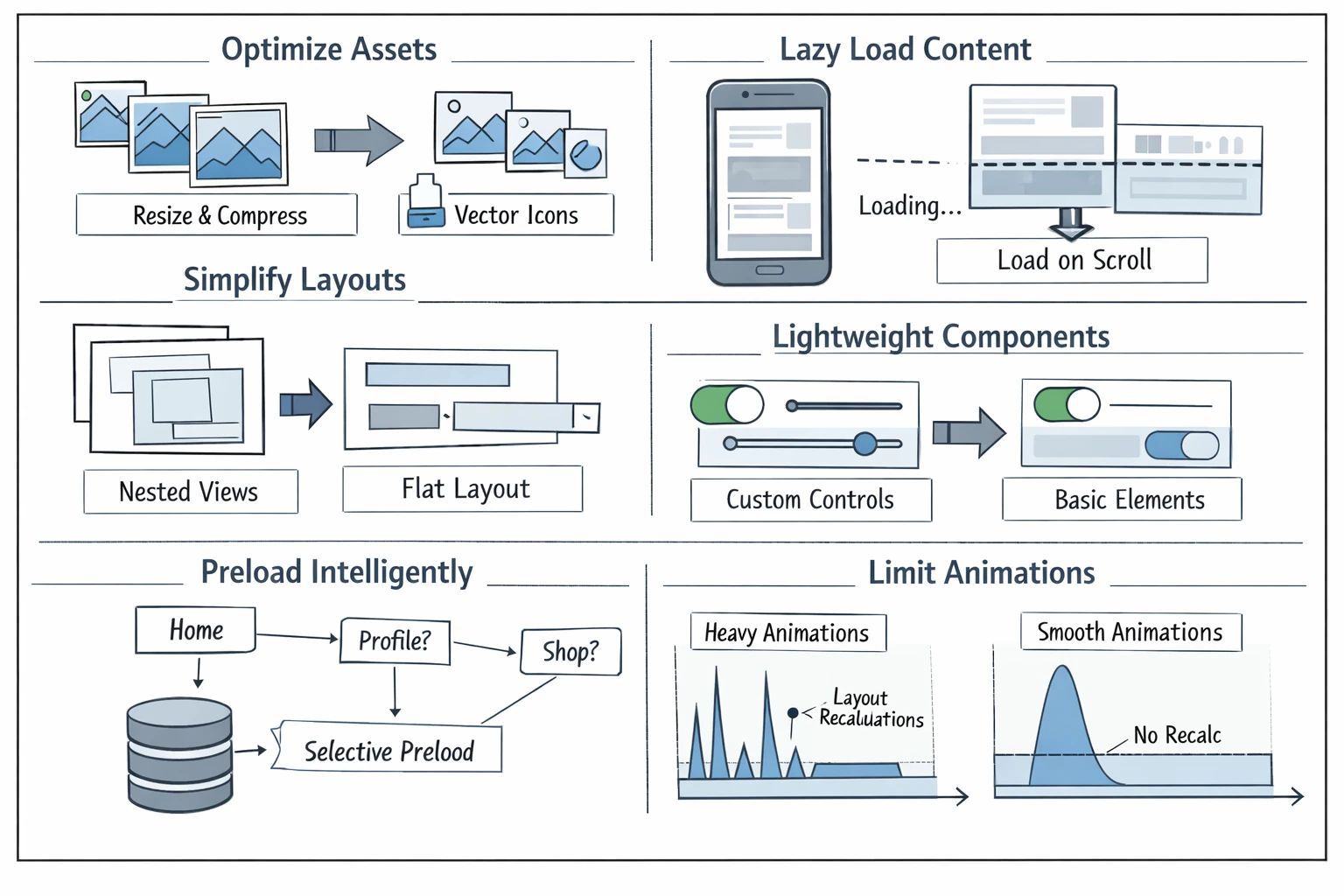
Small design changes can have big results. Focus on reducing work done on the main thread and on lowering the number of visible elements. These changes benefit both real and perceived performance.
Start by prioritizing content. Show the most important content first. Use progressive loading for images and large lists. Let users see something useful quickly while the rest loads in the background.
Here are practical techniques to improve UI performance. Each point is something designers can plan and developers can implement.
- Optimize assets: Resize and compress images, use vector icons when possible. Load only the sizes you need for each screen.
- Lazy load content: Load images and secondary sections only when they enter view. This reduces initial load time and saves memory.
- Simplify layouts: Reduce nesting and complex containers. Flatten view hierarchies to speed layout calculations.
- Use lightweight components: Choose simpler UI components that require less rendering work. Avoid heavy custom controls when simpler elements suffice.
- Preload intelligently: Preload data selectively based on user flow. Avoid fetching everything at app start.
- Limit animations: Use animations sparingly and animate properties that don’t trigger layout recalculation, like opacity and transform.
Designers should document these priorities in the style guide. That keeps choices consistent across screens. It also makes it easier for developers to apply the right optimizations from the start.
Patterns that improve perceived speed
Perceived speed is as important as raw speed. You can make an app feel fast even when some work is still happening. Good UI patterns help create that impression without cheating the user.
Micro-interactions and instant feedback matter a lot. A small visual confirmation after a tap tells users the app is working. That reduces frustration and improves trust.
Skeleton screens and progressive placeholders help too. Show a simple shape that matches the final content while data loads. Users feel less lost and judge the app as faster.
Below are common techniques to improve perception of speed. Use them thoughtfully and test their effect with real users.
- Skeleton loaders: Replace spinners with a layout-shaped placeholder that hints at where content will appear.
- Optimistic UI: Update the UI immediately for likely successful actions, then confirm with the server. This reduces waiting time for users.
- Progressive reveal: Show key content first, then reveal details. That keeps the screen useful sooner.
- Responsive touch feedback: Use quick visual responses on taps so users feel in control.
Testing and measuring UI performance
Measure before you change anything. Data shows what to optimize. Simple tests help you find the biggest wins. Testing also proves whether a UI change actually improves experience.
Use both lab tools and real-world metrics. Emulators and development devices are useful for repeatable tests. Field data from real users tells you how the app performs in varied conditions.
Below are steps to build a testing routine that links UI design to measurable results. Follow these steps regularly as the app evolves.
- Record baseline metrics: Capture load time, time to interactive, memory, and frame rate for key screens.
- Run A/B tests: Compare different UI options and measure the effect on your core metrics and user behavior.
- Collect real user metrics: Use lightweight analytics to record performance on real devices and networks.
- Profile rendering: Use profiling tools to find costly layout passes, heavy paints, and expensive scripts.
Testing cycles should be part of design reviews. Designers can run quick checks on prototypes to catch problems early. That reduces costly rework later in development.
Working across teams
Good UI performance requires collaboration. Designers, developers, and product managers must agree on priorities. Clear communication helps balance visual goals and device limits.
Create shared guidelines and performance budgets. A performance budget sets limits on image size, script load, and memory use. It gives teams a clear target to meet while designing screens.
Regular reviews help keep the app on track. Include performance checks in design handoffs and sprint demos. That makes optimizations part of the workflow rather than an afterthought.
When teams work together, they can build user-friendly mobile apps that feel fast and polished. That improves retention and reduces support cost over time.
Key Takeaways
UI design impact on apps goes beyond style. It shapes speed, responsiveness, and user trust. Simple design decisions often have large performance consequences.
Focus on visible content, optimize assets, and reduce layout complexity. Use placeholders and quick feedback to improve perceived performance. Measure the effects with real metrics so you know what works.
Keep designers and developers aligned with performance budgets and shared tests. That collaboration produces mobile app UX that is both beautiful and efficient. The result is happier users and better business outcomes.
Make small changes early and measure often. Over time, those changes add up to fast, reliable, and delightful apps that users will keep using.
