
Time is the one resource you cannot buy back, and modern teams need tools that help them plan, track, and focus. This article covers time management apps and how to choose the right one for teams and individuals. Read on for practical comparisons, feature checklists, and adoption tips to guide a confident purchase.
Why time management apps matter
Time management apps turn chaotic schedules into clear plans. They keep work visible, reduce friction, and help people focus on the tasks that move the needle. When teams use consistent apps, meetings run shorter and delivery becomes more predictable.
Companies that invest in good tools often see better morale and fewer late nights. The right app makes deadlines visible and shows where time leaks happen. Managers can spot overload before it breaks a sprint or a deadline.
For individuals, these apps create habits. A simple to-do list or a focused timer can boost daily output. Habit changes matter. Small steps add up and help people reclaim hours each week.
Adopting time management apps also supports remote and hybrid work. When people work in different places, a shared system keeps everyone aligned. This reduces unnecessary status updates and email threads.
Key features to compare
Choosing an app starts with knowing which features matter. Features determine how well an app fits your workflows and how much training is needed. Focus on the features that solve your current pain points.
Core features to consider include task lists, calendars, timers, reporting, and integrations. Some teams need project views like boards or timelines. Others need deep reporting to track billable hours or capacity.
Below is a focused list of essential features. Use it to compare vendors and shortlist products that match your team’s habits and tools.
- Task management: Create, assign, and prioritize tasks with deadlines and subtasks.
- Calendar sync: Bi-directional sync with Google Calendar, Outlook, or iCal to avoid double booking.
- Time tracking: Start/stop timers, manual entries, and automatic tracking for accuracy.
- Reporting: Visual reports on time spent, project health, and individual workload.
- Integrations: Connect with Slack, email, cloud drives, and developer tools to reduce context switching.
- Mobile apps and offline mode: Full-featured mobile apps help people update tasks on the go.
Not every team needs every feature. Prioritize the three features that solve your top problems and use those as the deal breaker in vendor demos. This keeps selection efficient and targeted.
Top time management apps for teams and individuals
There are many good products in the market. Some focus on task lists, others on time tracking or collaboration. Picking the right category helps narrow the list quickly.
If you want a blend of task management and project views, look for apps that support boards, lists, and timelines. If you bill by the hour, focus on accurate time tracking and invoicing integrations. If you work mainly on small tasks, choose a fast, lightweight option.
Here is a practical list of widely used apps and what they are best at. Consider this a starting point for product trials and mobile app reviews before you commit.
- Todoist: Simple task lists with strong cross-platform support. Great for personal productivity and small teams.
- Trello: Visual boards for workflow tracking. Easy to use and ideal for collaboration and simple projects.
- Asana: Task and project management with timeline views and advanced reporting for teams.
- Notion: Flexible workspace for notes, tasks, and lightweight project tracking. Good for hybrid personal and team use.
- Clockify: Free time tracking with team reports. Strong when accurate time logs are needed for billing.
- RescueTime: Automatic focus and distraction reports. Useful for individuals who want to reduce wasted time.
Try two or three tools on a short list and run a week-long pilot. Observe real work patterns and gather feedback from the people who will use the app daily. This practical test reveals integration friction and real adoption barriers.
How to choose the right app for your role
Different roles need different features. A project manager needs scheduling and reporting. An individual contributor may want a simple task list and a focus timer. Identifying role needs keeps the selection practical and fair.
Start by mapping current workflows. Note where time is wasted and where tools cause friction. Ask teams what tasks they repeat daily and what outcome they expect from a new app. That creates a clear shortlist of requirements.
Below are key questions to guide selection. Use them during demos and pilots to score each option against real needs.
- Does the app match the team workflow or require a big process change?
- Does it integrate with your calendar, chat, and storage tools?
- How steep is the learning curve and what training will be needed?
- Is mobile support robust for people who work on the go?
- What reporting is available to measure ROI and adoption?
Score each product on these questions and choose the one with the highest practical fit, not the one with the most features. Good fit leads to better adoption and faster return on investment.
Adoption and integration tips
Buying the right app is only half the job. Adoption determines whether the app creates value. Plan adoption with clear owners, training, and a simple rollout schedule. Small pilots often beat company-wide launches.
Start with a pilot group that represents different roles. Set short goals for the pilot, such as reducing meeting time or improving on-time task completion. Measure outcomes in simple metrics to show progress.
Use this list to guide your rollout. Each item helps reduce friction and speeds adoption when handled up front.
- Clear owner: Appoint one person to manage settings, templates, and permissions.
- Templates: Prebuild templates for common project types to avoid configuration delays.
- Training: Offer short, focused sessions and quick reference guides rather than long workshops.
- Feedback loop: Collect weekly feedback during the pilot and adjust settings quickly.
- Measure early wins: Track small wins like fewer status emails or faster task turnaround to build momentum.
Integration with existing tools matters. Sync calendars, connect chat apps, and automate common handoffs. That reduces duplicate work and encourages daily use. When integrations are solid, people treat the app as part of their workflow, not an extra chore.
Costs, tiers, and vendor considerations
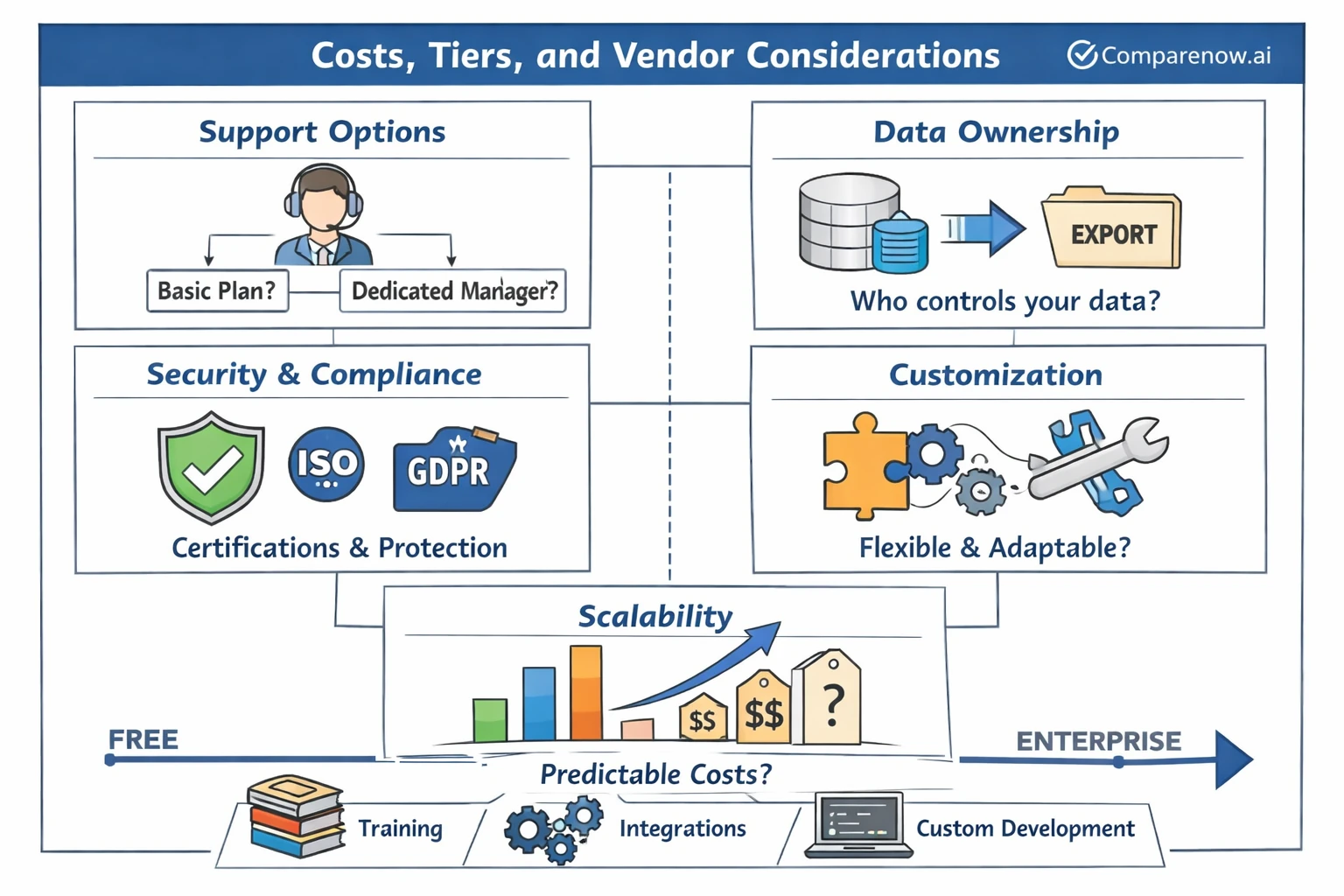
Pricing models range from free to per-user per-month subscriptions and enterprise licensing. Understand the total cost of ownership including training, integrations, and potential custom development. The cheapest option may cost more in time lost from poor fit.
Look at pricing tiers carefully. Many products have a free tier with limits and paid tiers that unlock reporting, admin controls, and integrations. Decide which paid features are must-haves versus nice-to-haves.
Here are vendor checkpoints to evaluate before purchase. These points will help you negotiate and avoid surprises after you sign a contract.
- Support options: What level of support comes with each tier? Is there a dedicated manager for larger plans?
- Data ownership: Confirm how your data is stored and how you can export it if you switch tools.
- Security and compliance: Check certifications and how the vendor protects user data.
- Customization: Can the app meet unique workflows without heavy development?
- Scalability: Does pricing remain predictable as you add users or teams?
Remember to include soft costs like the time IT spends on setup and the time managers spend on change management. These costs affect the real ROI of the platform.
Industry notes and related app categories
Time management apps sit next to many other mobile and desktop product categories. If you are evaluating vendors or writing procurement notes, consider how the app fits into a broader toolset. This helps when comparing cross-functional needs.
For example, product teams often balance time management apps with tools in these top app categories. Knowing these ecosystems helps you choose an app that integrates smoothly and avoids tool overlap.
Common related categories and real examples include:
- Project management tools and boards which overlap with task tracking.
- Time tracking and billing tools used by finance and consulting teams.
- Communication platforms that house quick status updates and notifications.
- Mobile-first categories like education apps or Mobile apps for healthcare that require strong mobile support.
- Other categories like social networking apps or finance apps which may require data sharing or authentication standards.
When you shortlist, check how each app behaves across these categories. For instance, look at mobile app reviews and Mobile app design to ensure the app meets your usability standards. A great desktop app with poor mobile support will slow teams that rely on phones.
Let’s Recap
Time management apps can change how teams work. They reduce friction, create habits, and make outcomes more visible. Focus on finding the product that solves your top problems rather than the one with the longest feature list.
Compare core features, run short pilots, and measure adoption. Use the checklists in this article to guide demos and to score vendors. Small pilots and clear metrics accelerate confident decisions and better results.
Finally, consider how the app fits with related tools and categories such as best mobile apps and Mobile app design. Pay attention to mobile support, reporting, and integration depth to ensure long-term value. With the right process, time management apps will help your team regain time and deliver more with less stress.
